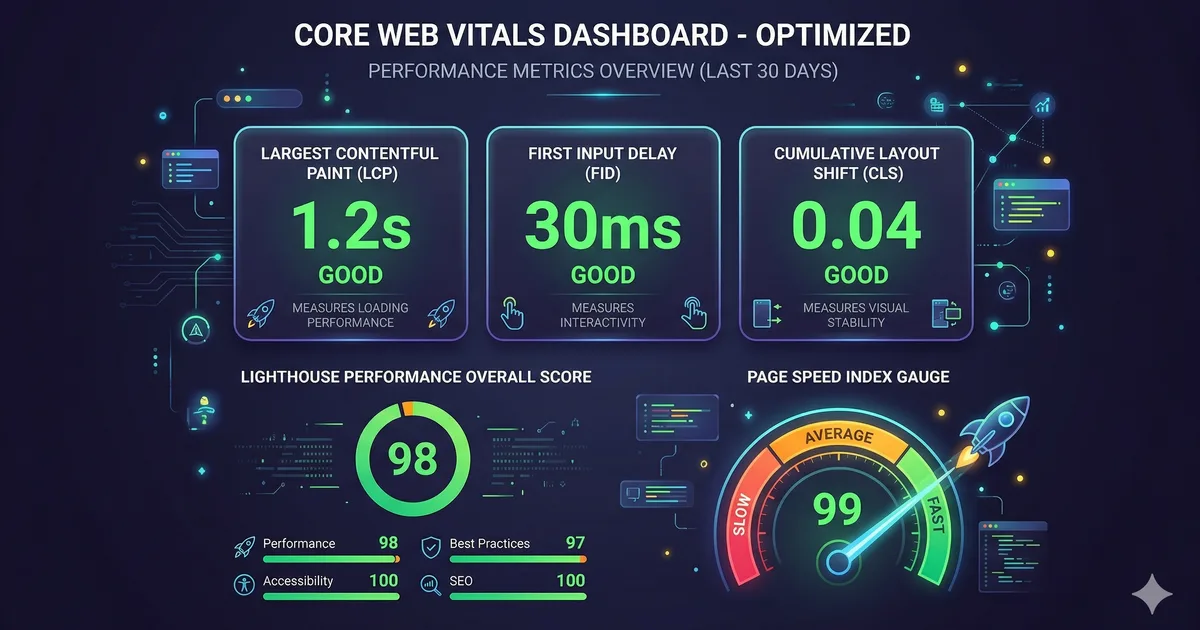

Qué son los Core Web Vitals?
Los Core Web Vitals son un conjunto de metricas definidas por Google que miden la experiencia real de los usuarios en una página web. En 2026 las tres metricas principales son:
- LCP (Largest Contentful Paint): velocidad de carga visual
- INP (Interaction to Next Paint): capacidad de respuesta
- CLS (Cumulative Layout Shift): estabilidad visual
Estas metricas son factores de ranking en Google y afectan directamente la conversión y retencion de usuarios.
LCP: Largest Contentful Paint
El LCP mide cuanto tarda en renderizarse el elemento más grande visible en el viewport. Generalmente es una imagen hero, un video o un bloque de texto grande.
Umbrales
| Clasificacion | Tiempo |
|---|---|
| Bueno | <= 2.5 segundos |
| Necesita mejora | <= 4.0 segundos |
| Pobre | > 4.0 segundos |
Estrategias para optimizar LCP
1. Optimizar la imagen hero
<!-- Usar formato moderno con fallback -->
<picture>
  <source srcset="/hero.avif" type="image/avif" />
  <source srcset="/hero.webp" type="image/webp" />
  <img src="/hero.jpg" alt="Banner principal"
       width="1200" height="600"
       fetchpriority="high"
       loading="eager" />
</picture>
Puntos clave:
- Usar
fetchpriority="high"en la imagen LCP - Nunca usar
loading="lazy"en la imagen LCP - Preferir formatos AVIF o WebP
- Siempre especificar
widthyheight
2. Precargar recursos críticos
<head>
  <!-- Precargar la imagen LCP -->
  <link rel="preload" as="image" href="/hero.webp"
        type="image/webp" fetchpriority="high" />

  <!-- Precargar la fuente principal -->
  <link rel="preload" as="font" href="/fonts/inter.woff2"
        type="font/woff2" crossorigin />
</head>
3. Eliminar CSS y JS que bloquean el renderizado
<!-- CSS crítico inline -->
<style>
  /* Solo estilos above-the-fold: header, hero, nav */
  :root { --color-bg: #0a0a0f; }
  .hero { min-height: 60vh; display: grid; place-items: center; }
</style>

<!-- CSS no crítico cargado de forma asincrona -->
<link rel="stylesheet" href="/styles.css" media="print"
      onload="this.media='all'" />

<!-- JavaScript diferido -->
<script src="/app.js" defer></script>
4. Server-Side Rendering (SSR)
Si usas un framework SPA como Angular, implementa SSR para que el HTML llegue pre-renderizado:
Sin SSR: HTML vacio -> Descargar JS -> Ejecutar JS -> Renderizar -> LCP
Con SSR: HTML completo -> LCP (mientras JS se descarga en paralelo)
INP: Interaction to Next Paint
INP reemplazo a FID (First Input Delay) en marzo de 2024. Mide el tiempo total desde que el usuario interactua (click, tap, tecla) hasta que el navegador pinta la siguiente frame.
Umbrales
| Clasificacion | Tiempo |
|---|---|
| Bueno | <= 200 ms |
| Necesita mejora | <= 500 ms |
| Pobre | > 500 ms |
Anatomia de una interacción
INP = Input Delay + Processing Time + Presentation Delay

1. Input Delay: tiempo esperando que el hilo principal este libre
2. Processing Time: tiempo ejecutando los event handlers
3. Presentation Delay: tiempo calculando layout, paint y composite
Estrategias para optimizar INP
1. Dividir tareas largas
// MAL: tarea larga que bloquea el hilo principal
function procesarDatos(items) {
  for (const item of items) {
    // operación costosa por cada item
    transformar(item);
  }
}

// BIEN: dividir en chunks con yield al navegador
async function procesarDatos(items) {
  const CHUNK_SIZE = 50;

  for (let i = 0; i < items.length; i += CHUNK_SIZE) {
    const chunk = items.slice(i, i + CHUNK_SIZE);

    for (const item of chunk) {
      transformar(item);
    }

    // Ceder el control al navegador entre chunks
    await scheduler.yield();
  }
}
2. Usar requestIdleCallback para trabajo no urgente
function trackEvent(data) {
  // No bloquear la interacción del usuario
  requestIdleCallback(() => {
    analytics.send(data);
  });
}
3. Virtualizar listas largas
En lugar de renderizar 10,000 elementos en el DOM, usa virtualizacion para renderizar solo los visibles. En Angular, puedes usar @angular/cdk/scrolling:
import { CdkVirtualScrollViewport } from '@angular/cdk/scrolling';

// Solo renderiza los items visibles + buffer
CLS: Cumulative Layout Shift
El CLS mide la suma de todos los cambios inesperados en el layout durante la vida de la página.
Umbrales
| Clasificacion | Score |
|---|---|
| Bueno | <= 0.1 |
| Necesita mejora | <= 0.25 |
| Pobre | > 0.25 |
Causas comunes de CLS y soluciones
1. Imagenes sin dimensiones
<!-- MAL: provoca layout shift cuando carga -->
<img src="foto.jpg" alt="Foto" />

<!-- BIEN: reserva espacio con width y height -->
<img src="foto.jpg" alt="Foto" width="800" height="450" />

<!-- BIEN: usar CSS aspect-ratio -->
<img src="foto.jpg" alt="Foto" style="aspect-ratio: 16/9; width: 100%;" />
2. Fuentes web que provocan FOUT
/* Usar font-display: swap con tamaños similares */
@font-face {
  font-family: 'Inter';
  src: url('/fonts/inter.woff2') format('woff2');
  font-display: swap;
  /* Ajustar metricas para minimizar el shift */
  size-adjust: 100%;
  ascent-override: 90%;
  descent-override: 20%;
  line-gap-override: 0%;
}
3. Contenido inyectado dinamicamente
/* Reservar espacio para banners o ads */
.ad-slot {
  min-height: 250px;
  width: 100%;
  contain: layout;
}
4. Animaciones que provocan layout
/* MAL: top/left provocan layout */
.menu {
  position: absolute;
  top: 0;
  transition: top 0.3s;
}

/* BIEN: transform no provoca layout */
.menu {
  position: absolute;
  transform: translateY(0);
  transition: transform 0.3s;
}
Herramientas de medicion
Datos de campo (Real User Monitoring)
- Chrome UX Report (CrUX): datos reales agregados de millones de usuarios Chrome
- web-vitals library: biblioteca JavaScript para medir en tus propios usuarios
import { onLCP, onINP, onCLS } from 'web-vitals';

onLCP(metric => sendToAnalytics('LCP', metric));
onINP(metric => sendToAnalytics('INP', metric));
onCLS(metric => sendToAnalytics('CLS', metric));
Datos de laboratorio
- Lighthouse: auditorias automatizadas en Chrome DevTools
- WebPageTest: pruebas detalladas con diferentes condiciones de red
- Chrome DevTools Performance panel: análisis frame a frame
Checklist de rendimiento web
- La imagen LCP usa
fetchpriority="high"y formato moderno - El CSS crítico esta inline en el
<head> - JavaScript no crítico usa
deferoasync - Todas las imagenes tienen
widthyheightdefinidos - Las fuentes web usan
font-display: swapconpreload - Las tareas de JS mayores a 50ms estan divididas en chunks
- Las animaciones usan
transformyopacity, no propiedades de layout - Los recursos de terceros usan
preconnectodns-prefetch
Conclusion
Optimizar los Core Web Vitals no es solo una cuestion de SEO: es construir una experiencia que respete el tiempo y la atención de tus usuarios. Con LCP, INP y CLS como guias, tienes metricas concretas y accionables. Mide, optimiza, vuelve a medir. La performance es un proceso continuo, no un destino.
Comentarios (0)
Inicia sesión para comentar