
Git: beyond add, commit, and push
Most developers use Git at a basic level: add, commit, push, pull. But Git is an extraordinarily powerful tool that, when used properly, can transform a team's productivity. In this article we explore advanced techniques and professional workflows.
Branching strategies
GitHub Flow (recommended for most teams)
The simplest and most effective flow for most teams:
main (always deployable)
  |
  +-- feat/new-feature
  |     |-- commit 1
  |     |-- commit 2
  |     +-- PR -> merge to main
  |
  +-- fix/bug-fix
        |-- commit 1
        +-- PR -> merge to main
Rules:
mainis always in a deployable state- Create a descriptive branch for each task
- Open a PR with code review before merging
- Deploy immediately after the merge
GitFlow (for planned releases)
For projects with defined release cycles:
main (production)
  |
develop (integration)
  |
  +-- feature/login
  +-- feature/dashboard
  |
release/1.2.0 (preparation)
  |
hotfix/critical-bug (production emergencies)
Trunk-Based Development (for mature CI/CD)
Everyone works directly on main with feature flags:
main
  |-- commit (with feature flag)
  |-- commit (with feature flag)
  |-- commit
Requires: robust CI/CD, feature flags, strong automated testing.
Atomic and conventional commits
Conventional Commits
A message convention that facilitates automatic changelog generation:
<type>(<scope>): <description>

[optional body]

[optional footer]
Standard types:
| Type | Usage |
|---|---|
feat |
New feature |
fix |
Bug fix |
docs |
Documentation changes |
style |
Formatting (no logic changes) |
refactor |
Restructuring without functional change |
perf |
Performance improvement |
test |
Add or modify tests |
chore |
Maintenance tasks |
ci |
CI/CD changes |
Real examples:
git commit -m "feat(auth): add Google OAuth login flow"
git commit -m "fix(search): resolve empty results on special characters"
git commit -m "refactor(courses): migrate to signal-based state"
git commit -m "perf(images): implement lazy loading for course thumbnails"
Atomic commits
Each commit should represent a single logical change that can be reverted independently:
# BAD: one giant commit
git commit -m "add login, fix navbar, update styles, refactor services"

# GOOD: atomic commits
git commit -m "feat(auth): add login component with form validation"
git commit -m "fix(navbar): correct sticky positioning on scroll"
git commit -m "style(global): update color variables for dark mode"
git commit -m "refactor(services): extract HTTP logic to base service"
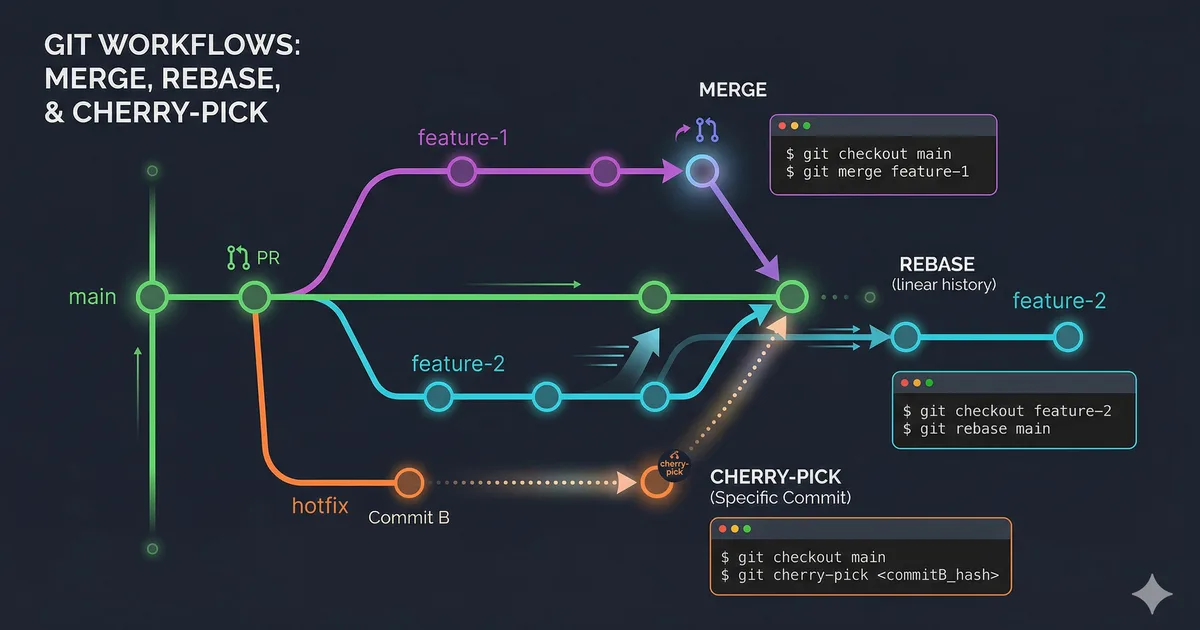
Interactive rebase
Interactive rebase lets you rewrite commit history before merging.
Cleaning up history before a PR
# Interactive rebase of the last 4 commits
git rebase -i HEAD~4
This opens an editor with the options:
pick abc1234 feat(search): add search input component
pick def5678 WIP: search logic
pick ghi9012 fix typo in search
pick jkl3456 feat(search): add results list

# Available commands:
# p, pick   = use commit as is
# r, reword = use commit but edit message
# e, edit   = use commit but pause for editing
# s, squash = combine with previous commit
# f, fixup  = like squash but discard message
# d, drop   = remove commit
Clean result:
pick abc1234 feat(search): add search input component
fixup def5678 WIP: search logic
fixup ghi9012 fix typo in search
pick jkl3456 feat(search): add results list
Now you have 2 clean commits instead of 4 messy ones.
Rebase vs Merge
| Aspect | Rebase | Merge |
|---|---|---|
| History | Linear, clean | With merge commits |
| Conflicts | Resolved commit by commit | Resolved once |
| Safety | Rewrites history | Does not rewrite anything |
| Recommended | Local branches, before PR | Shared branches, PRs |
Golden rule: Never rebase branches that are already published and shared.
Git Bisect: finding the commit that broke something
git bisect uses binary search to find the exact commit that introduced a bug:
# Start bisect
git bisect start

# Mark current state as bad
git bisect bad

# Mark a previous commit where it worked
git bisect good v1.0.0

# Git checks out an intermediate commit
# Test if the bug exists and mark:
git bisect good  # if it works
git bisect bad   # if it has the bug

# Git keeps dividing until it finds the exact commit
# Result: "abc1234 is the first bad commit"

# End bisect
git bisect reset
Automating bisect with a script
# Automatically run a test for each commit
git bisect start HEAD v1.0.0
git bisect run npm test -- --filter "search.spec"
Git runs the test on each commit and automatically marks good/bad based on the exit code.
Git Worktrees: multiple branches simultaneously
Worktrees let you have multiple branches checked out at the same time in separate directories:
# Create a worktree for a hotfix without losing your current work
git worktree add ../hotfix-login fix/login-crash

# Work on the hotfix
cd ../hotfix-login
# ... make changes, commit, push ...

# Return and remove the worktree
cd ../main-project
git worktree remove ../hotfix-login
Advantages:
- No need for stash or temporary commits
- You can work on two features simultaneously
- Ideal for code reviews while working on something else
Git Hooks with Husky
Hooks run scripts automatically on Git events:
# Install husky
npm install -D husky
npx husky init
Pre-commit: verify before each commit
# .husky/pre-commit
npx lint-staged
With lint-staged in package.json:
{
  "lint-staged": {
    "*.ts": ["eslint --fix", "prettier --write"],
    "*.css": ["prettier --write"],
    "*.html": ["prettier --write"]
  }
}
Commit-msg: validate message format
# .husky/commit-msg
npx commitlint --edit $1
With the commitlint configuration:
// commitlint.config.js
export default {
  extends: ['@commitlint/config-conventional'],
  rules: {
    'scope-enum': [2, 'always', [
      'auth', 'blog', 'courses', 'search', 'ui', 'core'
    ]],
  },
};
Advanced Git Stash
Stash with a name
# Save with a descriptive message
git stash push -m "WIP: search dialog keyboard navigation"

# View saved stashes
git stash list
# stash@{0}: On feat/search: WIP: search dialog keyboard navigation

# Apply a specific stash without removing it
git stash apply stash@{0}

# Apply and remove
git stash pop stash@{0}
Partial stash
# Stash only specific files
git stash push -m "styles only" src/styles.css src/app/**/*.css

# Interactive stash: choose hunks
git stash push -p -m "partial changes"
Advanced Git Log
Visualizing history clearly
# Commit graph with colors
git log --oneline --graph --all --decorate

# Search commits by message
git log --grep="search" --oneline

# Commits from an author in a date range
git log --author="David" --after="2025-01-01" --before="2026-01-01" --oneline

# Files changed in each commit
git log --stat --oneline -10

# Changes in a specific file
git log --follow -p -- src/app/core/services/search.service.ts
Useful aliases for your .gitconfig
[alias]
  lg = log --oneline --graph --all --decorate -20
  st = status -sb
  co = checkout
  br = branch -v
  unstage = reset HEAD --
  last = log -1 HEAD --stat
  contributors = shortlog -sn --all
  changed = diff --name-status
Checklist for teams
- Define and document the branching strategy
- Use Conventional Commits with commitlint
- Set up pre-commit hooks with lint-staged
- Require PRs with at least one reviewer
- Keep PRs small and focused (under 400 lines)
- Use squash merge or rebase before merging
- Protect the
mainbranch against direct push - Automate CI on each PR (lint, test, build)
Conclusion
Git is much more than a version control system: it is a collaboration tool that, when properly configured, can eliminate significant friction in a team's workflow. Invest time in learning interactive rebase, bisect, and worktrees. Set up hooks and commit conventions. Your future self (and your team) will thank you.
Comments (0)
Sign in to comment