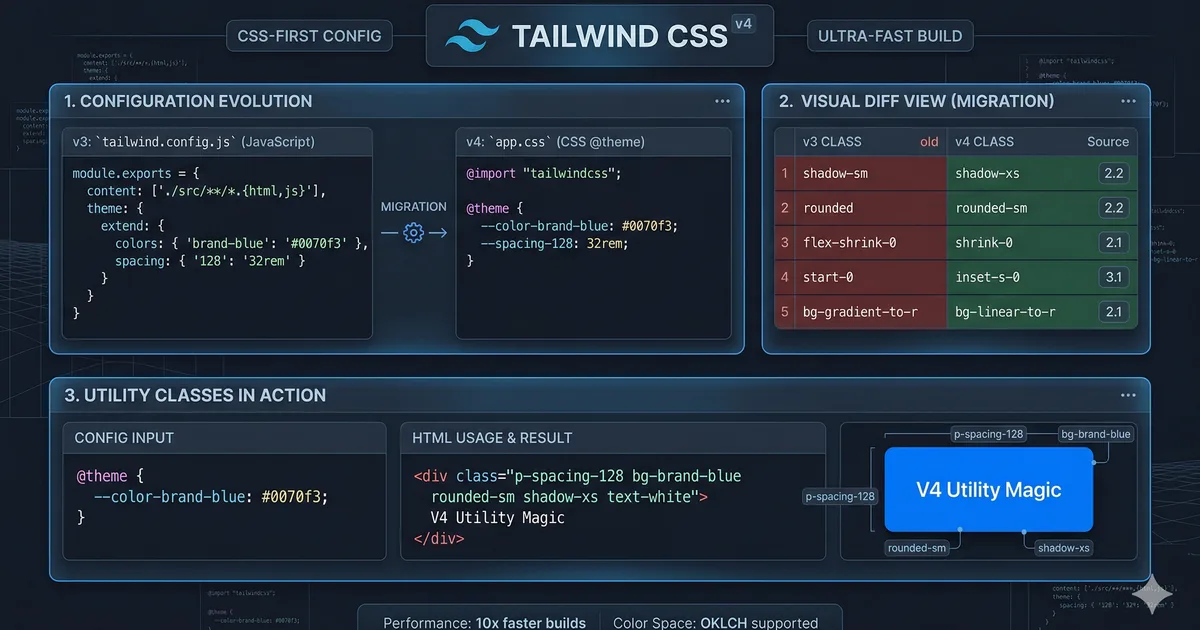

Tailwind CSS v4: a complete rewrite
Tailwind CSS v4 is not an incremental update: it's a complete rewrite from scratch. The new engine, based on the Oxide project written in Rust, offers up to 10x faster compilation, native CSS configuration, and a model more aligned with web standards.
The main changes
1. Configuration in CSS, not JavaScript
The most significant change is that configuration is done directly in CSS using the @theme directive, eliminating the tailwind.config.js file.
@import "tailwindcss";

@theme {
  --color-primary: #ffc400;
  --color-secondary: #e6286a;
  --font-sans: "Inter", system-ui, sans-serif;
  --radius-lg: 1rem;
}
This means:
- Your configuration is standard CSS
- Theme variables are real CSS custom properties
- You can access theme values from any CSS
2. Automatic content detection
In v3, you needed to manually configure the file paths to scan:
// v3 - configuración manual
content: ['./src/**/*.{html,ts,tsx}']
In v4, Tailwind automatically detects your project's files by analyzing the repository structure. You only need to exclude files if necessary:
/* v4 - exclusion opcional */
@source not "./src/legacy/**";
3. CSS-first, not utility-first
Tailwind v4 relies more on native CSS. Many features that previously required special configuration now use CSS standards:
/* Variables del tema son CSS custom properties reales */
.custom-element {
  background: var(--color-primary);
  font-family: var(--font-sans);
  border-radius: var(--radius-lg);
}
New utilities and syntax
Native container queries
<!-- Definir un contenedor -->
<div class="@container">
  <!-- Responder al tamaño del contenedor -->
  <div class="@sm:grid @sm:grid-cols-2 @lg:grid-cols-3">
    <!-- contenido -->
  </div>
</div>
You can also name containers:
<div class="@container/sidebar">
  <div class="@sm/sidebar:flex @md/sidebar:grid">
    <!-- contenido -->
  </div>
</div>
Open field variants
<!-- Estilos basados en el estado de inputs hijos -->
<fieldset class="has-[:focus]:ring-2 has-[:invalid]:border-red-500">
  <input type="email" required />
</fieldset>

<!-- Variante not -->
<div class="not-[:first-child]:border-t">
  <!-- todos excepto el primer hijo tienen borde superior -->
</div>
Improved gradients
<!-- Interpolacion en oklch para gradientes más naturales -->
<div class="bg-linear-to-r/oklch from-blue-500 to-green-500">
  <!-- gradiente con interpolación perceptual -->
</div>

<!-- Angulos personalizados -->
<div class="bg-linear-[135deg] from-amber-400 to-rose-500">
  <!-- gradiente a 135 grados -->
</div>
3D transforms
<div class="rotate-x-45 rotate-y-12 perspective-800">
  <!-- Transformaciones 3D directas -->
</div>
Syntax changes: v3 vs v4
| Concept | v3 | v4 |
|---|---|---|
| Main import | @tailwind base; @tailwind components; @tailwind utilities; |
@import "tailwindcss"; |
| Configuration | tailwind.config.js |
@theme { } in CSS |
| Custom colors | theme.extend.colors |
--color-* in @theme |
| Custom spacing | theme.extend.spacing |
--spacing-* in @theme |
| Custom breakpoints | theme.screens |
--breakpoint-* in @theme |
| Custom fonts | theme.fontFamily |
--font-* in @theme |
| Plugins | plugins: [require('...')] |
@plugin "..." in CSS |
| Container queries | Plugin required | Native with @container |
| Content paths | content: [...] |
Automatic detection |
Renamed utilities
Some utilities were renamed for consistency:
| v3 | v4 | Reason |
|---|---|---|
shadow-sm |
shadow-xs |
More logical scale |
shadow |
shadow-sm |
Consistency |
drop-shadow-sm |
drop-shadow-xs |
Same scale as shadow |
blur-sm |
blur-xs |
Consistency |
rounded-sm |
rounded-xs |
Same logic |
outline-none |
outline-hidden |
More descriptive |
ring |
ring-3 |
Explicit width |
flex-grow |
grow |
Simplification |
flex-shrink |
shrink |
Simplification |
bg-opacity-50 |
bg-black/50 |
Modifier syntax |
Step-by-step migration guide
Step 1: Update dependencies
# Instalar Tailwind v4
npm install tailwindcss@4

# Para Angular, instalar el plugin de PostCSS
npm install @tailwindcss/postcss@4
Step 2: Migrate the configuration
Replace tailwind.config.js with a @theme block in your main CSS:
/* src/styles.css */
@import "tailwindcss";

@theme {
  /* Mover tus colores custom */
  --color-brand: #ffc400;
  --color-brand-hover: #ff9100;

  /* Mover tus fuentes */
  --font-sans: "Inter", system-ui, sans-serif;

  /* Mover tus breakpoints si los personalizaste */
  --breakpoint-sm: 40rem;
  --breakpoint-md: 48rem;
  --breakpoint-lg: 64rem;
}
Step 3: Use the automatic migration tool
Tailwind v4 includes a codemod for automatic migration:
npx @tailwindcss/upgradeThis command:
- Converts
tailwind.config.jsto@themein CSS - Renames deprecated utilities
- Updates the import syntax
- Migrates compatible plugins
Step 4: Update renamed classes
Search and replace classes that changed names. The codemod handles most of them, but verify manually:
# Buscar clases potencialmente obsoletas
grep -r "shadow-sm\|rounded-sm\|blur-sm\|ring " src/
Step 5: Verify dark mode
/* v4 usa la media query por defecto */
/* Para usar clase, configurar: */
@variant dark (&:where(.dark, .dark *));
Performance: the numbers
Tailwind v4's Oxide (Rust) engine offers dramatic improvements:
| Metric | v3 | v4 | Improvement |
|---|---|---|---|
| Full build | ~350ms | ~35ms | ~10x |
| Incremental build | ~180ms | ~8ms | ~22x |
| CSS size | Variable | Smaller | Better tree-shaking |
Conclusion
Tailwind CSS v4 is a generational leap. CSS-native configuration, automatic content detection, and the Oxide engine make the workflow faster and more natural. The automatic migration tool eases the transition, but take time to familiarize yourself with the new theme syntax and renamed utilities. If you're starting a new project, there's no reason not to use v4.
Comments (0)
Sign in to comment