
What is RAG?
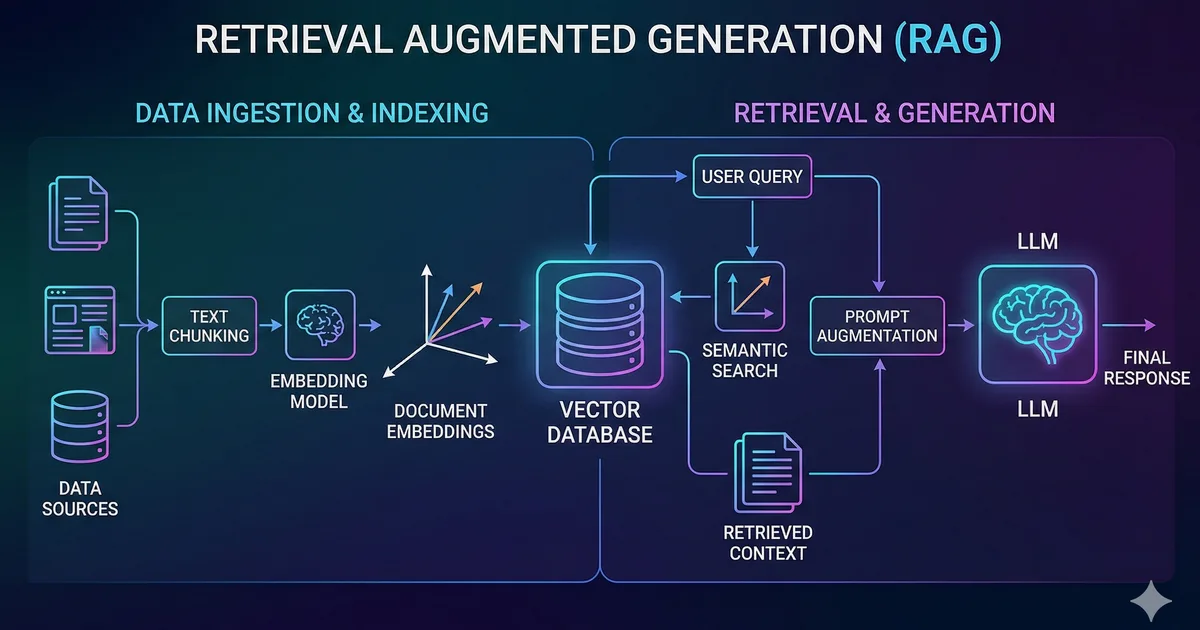
RAG (Retrieval-Augmented Generation) is a technique that combines searching for relevant information with text generation using a language model. Instead of relying solely on the model's internal knowledge, we provide it with specific context from our own data.
Why do you need RAG?
Language models have important limitations:
- Outdated knowledge: Their training has a cutoff date
- Hallucinations: They can generate plausible but incorrect information
- No private data: They don't know your company's internal documentation
RAG solves all three problems by injecting relevant, up-to-date information directly into the prompt.
Architecture of a RAG system
A RAG system has three main components:
1. Document ingestion
The first step is preparing your documents. This involves:
- Chunking: Splitting long documents into manageable fragments
- Embedding: Converting each fragment into a numerical vector
- Storage: Saving the vectors in a vector database
2. Retrieval
When the user asks a question:
- The question is converted into an embedding
- The most similar documents are searched for in the vector database
- The top-K most relevant documents are selected
3. Generation
The retrieved documents are injected as context into the language model's prompt, which generates a response based on that information.
Tutorial: Building a RAG from scratch
Let's build a complete RAG system step by step using TypeScript.
Step 1: Prepare the documents
First we need to split our documents into chunks. A common strategy is to split by paragraphs with overlap:
interface Chunk {
  id: string;
  content: string;
  metadata: {
    source: string;
    position: number;
  };
}

function chunkText(
  text: string,
  chunkSize: number = 500,
  overlap: number = 50
): string[] {
  const chunks: string[] = [];
  let start = 0;

  while (start < text.length) {
    const end = Math.min(start + chunkSize, text.length);
    chunks.push(text.slice(start, end));
    start += chunkSize - overlap;
  }

  return chunks;
}
Step 2: Generate embeddings
Embeddings are numerical representations of the meaning of text. Texts with similar meanings will have close vectors in vector space.
Step 3: Similarity search
Cosine similarity is the most common metric for comparing embeddings. A value of 1 indicates identical meaning, while 0 indicates no relationship.
Step 4: Generate with context
Finally, we send the question along with the retrieved documents to the language model.
Chunking strategies
How you split your documents has a huge impact on the quality of results.
| Strategy | Advantage | Disadvantage |
|---|---|---|
| Fixed size | Simple to implement | May cut ideas in half |
| By paragraphs | Preserves logical units | Variable sizes |
| Semantic | Better coherence | More complex and costly |
| Recursive | Balance between coherence and size | Requires configuration |
Practical recommendations
- Use chunks of 200-500 tokens for technical documentation
- Add overlap of 50-100 tokens to maintain context
- Include metadata (section title, source) in each chunk
- Experiment with different sizes for your use case
Vector databases
For production, you need a dedicated vector database instead of searching in memory.
Popular options
- pgvector: PostgreSQL extension. Ideal if you already use Postgres
- ChromaDB: Open source, easy to set up, perfect for prototypes
- Pinecone: Managed service, scalable, no infrastructure to maintain
- Qdrant: Open source, high performance, REST API
Example with pgvector
-- Crear tabla con columna vector
CREATE TABLE documents (
  id SERIAL PRIMARY KEY,
  content TEXT NOT NULL,
  embedding vector(1536),
  metadata JSONB
);

-- Crear índice para busqueda rápida
CREATE INDEX ON documents
  USING ivfflat (embedding vector_cosine_ops)
  WITH (lists = 100);

-- Buscar documentos similares
SELECT content, 1 - (embedding <=> $1::vector) AS similarity
FROM documents
ORDER BY embedding <=> $1::vector
LIMIT 5;
Evaluating your RAG
Measuring the quality of a RAG system is essential. The key metrics are:
- Retrieval precision: Are the retrieved documents relevant?
- Recall: Are all relevant documents retrieved?
- Response fidelity: Is the response based on the provided context?
- Response relevance: Does the response answer the question?
Common mistakes and how to avoid them
- Chunks too large: The model gets lost in irrelevant context
- Chunks too small: They lose necessary context
- Not filtering by relevance: Including documents with low similarity adds noise
- Ignoring the system prompt: A good system prompt guides the model to use the context correctly
- Not handling the "no results" case: When there are no relevant documents, the model should admit it
Conclusion
RAG is one of the most practical techniques for integrating AI into real applications. It allows you to leverage the power of language models with your own data, keeping responses accurate and up to date.
The complete flow is: chunking, embedding, storage, search, and generation. Each step offers optimization opportunities depending on your specific use case.
Comments (0)
Sign in to comment